
How to Choose a 4U Rackmount Industrial PC: From Motherboard Configurations to Industrial Applications
1. Why Do Industrial Applications Require Different Types of Industrial PCs?
Different devices on an industrial automation production line have different computing requirements. Some equipment has limited internal space and requires a compact embedded industrial PC. Other systems need to connect multiple industrial cameras, image acquisition cards, network cards, and graphics cards, making a rackmount industrial PC a more suitable choice.
These differences mainly come from practical application requirements, including computing performance, interface availability, expansion capabilities, installation space, and future maintenance needs.
For applications such as machine vision inspection, automated equipment, and industrial data processing, rackmount industrial PCs provide sufficient space for hardware expansion and can be conveniently installed in standard cabinets. However, the same chassis size does not necessarily mean the same computing performance. Choosing the right product requires looking beyond the chassis dimensions to examine the motherboard, processor, memory, and expansion interfaces.
This article explores the structure, industrial applications, hardware configurations, and selection process of 4U rackmount industrial PCs to help you identify a suitable solution for your project.
2. What Is a 4U Rackmount Industrial PC? What Are Its Key Features?
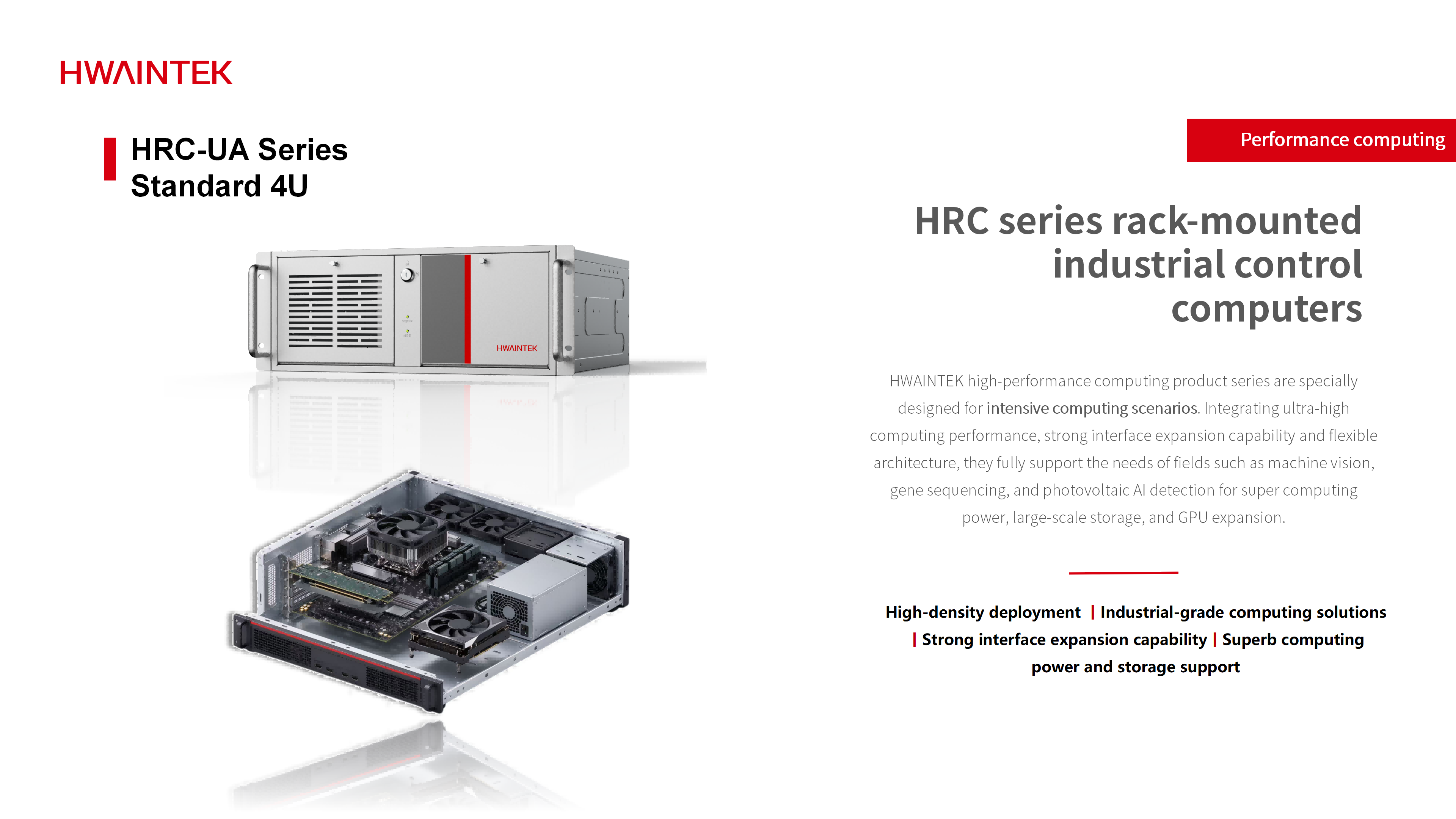
2.1 What Is a 4U Rackmount Industrial PC?
A rackmount industrial PC is built to install in a standard equipment rack, centralizing hardware... simplifying integration and maintenance than embedding computers inside each piece of equipment.
"U" is the standard rack height unit—about 44.45 mm, so 4U is roughly 177.8 mm high, designed to fit a standard 19-inch rack. Confirm exact dimensions against the spec before ordering.
HWAINTEK's HRC series uses a 4U chassis that can be configured with different industrial motherboards. A typical build consists of:
Motherboard and processor — determines the supported CPU platform, memory type, and expansion options.
Memory and storage — runs inspection software, buffers images, and stores results.
Expansion slots — takes image acquisition cards, extra NICs, and discrete GPUs.
Power and cooling — sized for reliable operation, including multi-card configurations.
The chassis only provides physical space; the internal hardware largely decides computing and expansion capability. That is why two industrial PCs that look nearly identical can be built for very different tasks.
2.2 Key Features of 4U Rackmount Industrial PCs
Flexible hardware: CPU and memory match the project; the right motherboard scales from light data acquisition to heavy image processing.
PCIe expansion: slots take acquisition cards, NICs and GPUs; slot count, generation and lane allocation shape the build.
Flexible storage: combine SSD and SATA per motherboard support for OS, image buffering and archiving.
Easy integration: standard rack mounting centralizes installation and servicing; still verify chassis depth, cabinet space, power and cooling on site.
Note: 4U is physical size, not performance—configure by actual workload.
3. How Are 4U Rackmount Industrial PCs Used in Industrial Applications?
A rackmount industrial PC's value is not just fitting into a cabinet—it is matching the computing and expansion needs of the actual system. Two common cases show how this plays out.
3.1 3C Electronics Inspection: Multiple Cameras and Acquisition Cards
In 3C manufacturing, smartphone frames, components and PCBs need visual inspection, dimension measurement and code reading, with one automated station inspecting a product from several angles at once. This puts four demands on the IPC:
Image acquisition: camera count and interface types decide whether onboard LAN ports suffice or extra NICs / acquisition cards are needed.
Data processing — with multiple image streams running at once, CPU and memory must be sized by resolution, cycle time, and software load.
Expansion — acquisition cards, NICs, and GPUs may go in together, so slot count, specs, and lane allocation must be checked upfront.
Future expansion — reserve headroom if more cameras or algorithm upgrades are planned.
For multi-camera equipment, processor specs alone don't confirm a fit—the motherboard's expansion capability matters just as much.
3.2 New Energy Inspection: High-Load Image Processing and AI Inference
In photovoltaic and lithium battery production, vision handles surface inspection, dimension measurement and defect identification. As accuracy, line speed and algorithm complexity rise, some systems need higher-resolution images or deep-learning defect models. The platform must balance:
Processor performance — for image preprocessing and parallel data tasks.
Memory capacity — sized by image size, concurrent tasks, and software needs.
Graphics and expansion — if GPU acceleration is required, motherboard slots, chassis space, PSU, and cooling must all support it.
Storage — planned by image volume, retention period, and read/write demand.
Not every new-energy system needs a discrete GPU—traditional positioning, measurement and code reading may run fine on a strong CPU; add a GPU only when the algorithm calls for it. The contrast: 3C inspection leans on multi-camera connectivity and PCIe expansion, while AI-heavy inspection leans on compute, memory and GPU support.
4. Why Do 4U Rackmount Industrial PCs Have Different Configurations?
Although 4U rackmount industrial PCs may look similar externally, their internal configurations can vary significantly. The motherboard, processor, memory, and expansion capabilities all affect system performance and application compatibility.
4.1 Motherboard and Processor
The motherboard determines processor compatibility, memory support, and available expansion interfaces. Different HWAINTEK HRC motherboards support different platform generations and configurations, so the choice should be based on the required processing performance and peripheral compatibility.
| Motherboard Model | Platform Characteristics | Key Selection Considerations |
| HE-Z390-A-RC-A | Intel Z390 platform with legacy PCI expansion interfaces | Legacy equipment upgrades and compatibility with older acquisition cards |
| HE-H470-RC / HE-W480-RC | Designed for 10th- and 11th-generation processor platforms | Processor compatibility, memory capacity, and interface configuration |
| HE-H610D-RC | Intel H610 platform | DDR4 memory, PCIe expansion, and mainstream machine vision applications |
| HE-Q670D-RC / HE-Q670S-RC | Designed for different configurations of 12th-, 13th-, and 14th-generation processor platforms | Memory type, expansion slots, and multi-card connectivity |
| HE-W680-RC | Intel W680 platform | DDR5 memory and high-bandwidth expansion requirements |
| HE-Q870D-RC | Intel Q870 platform | Processor compatibility, DDR5 memory, and overall computing configuration |
4.2 Memory and Storage
Memory capacity affects how efficiently a system handles multiple tasks and large datasets. Storage should be selected according to data volume, access speed, and application requirements.
4.3 PCIe Expansion
PCIe slots allow users to add components such as frame grabbers, motion control cards, and network cards. Before selecting a motherboard, check the number of available slots, their electrical configurations, and whether they meet the project's expansion requirements.
4.4 GPU Support
Applications involving AI inference or complex image processing may require a dedicated GPU. In these cases, consider motherboard expansion support, available space, power supply capacity, and cooling requirements when choosing the system configuration.
For the HWAINTEK HRC series, motherboard selection should be based on the processor platform, memory requirements, and expansion cards needed for the intended application. Always refer to the official specifications to confirm compatibility.
5. How to Choose the Right 4U Rackmount Industrial PC
Choosing a 4U rackmount industrial PC involves more than comparing CPU models or memory capacity. The right configuration depends on the application, the expansion cards required, and the operating environment. Before making a decision, consider the following factors.
5.1 Match Performance to the Application
Start by identifying the main tasks the system needs to handle. Basic industrial control and data collection may not require the same processing power as multi-camera inspection or AI-based image analysis. Selecting a suitable processor helps balance system performance and overall cost.
5.2 Check Memory and Storage Requirements
Memory and storage should match the amount of data being processed and the way the system is used. Applications that handle large images, frequent data transfers, or multiple tasks simultaneously may require more memory. Storage capacity and type should also be considered based on data volume, access frequency, and reliability requirements.
5.3 Evaluate Expansion Slots and Interfaces
Expansion capability is especially important for industrial applications. Machine vision systems may need frame grabbers or additional interface cards, while motion control systems may require dedicated control cards. AI inspection applications may also need a GPU.
Before selecting a motherboard, check the number and type of available PCIe slots, their electrical lane configuration, and whether the required cards can be installed together.
5.4 Consider the Installation Environment
Consider the available cabinet space, ambient temperature, ventilation, dust, and vibration. The system's physical dimensions, cooling design, and power supply must suit the actual installation conditions to support stable long-term operation.
5.5 Leave Room for Future Expansion
Industrial equipment often needs to be upgraded or connected to additional devices over time. If future expansion is likely, consider reserving sufficient PCIe slots, memory capacity, storage space, and connectivity during the initial selection process. This can reduce the need to replace the entire system when requirements change.
6. How to Select a HWAINTEK HRC Series Rackmount Industrial PC
6.1 HRC Series Product Positioning
The HWAINTEK HRC series is a 4U rackmount platform for industrial computing and machine vision. A standard chassis pairs with different industrial motherboards, so you choose by processor, memory, and expansion—not by appearance.
6.2 Selecting a Configuration Based on Application Requirements
Legacy upgrades — keep old PCI acquisition cards? Look at the HE-Z390-A-RC-A, which retains legacy PCI slots.
Conventional machine vision — size CPU and memory by camera count and cycle time; confirm Ethernet and slots are enough.
Multi-camera, multi-card — prioritize PCIe lanes and slot count; the HE-Q670D-RC is a typical candidate.
AI vision — match GPU, motherboard, PSU, and cooling together; consider the HE-W680-RC or HE-Q870D-RC.
6.3 Determine the Final Configuration
Define the task, list peripherals, plan storage, then check cabinet and power. The chassis is standardized—the motherboard decides what the machine can do. Send us your camera count, algorithm, and cabinet size, and we'll match a configuration that fits today and leaves room to grow.